Transition Rules
Control which status changes are allowed and who can perform them
Manage Transitions
Easily manage status transitions from the UI without any line of code.
Transitions define which status changes are valid for a model.
Without restrictions, any status can be set at any time.
If you don't need transition restrictions, click Disable Transitions — any status will be allowed at any time.
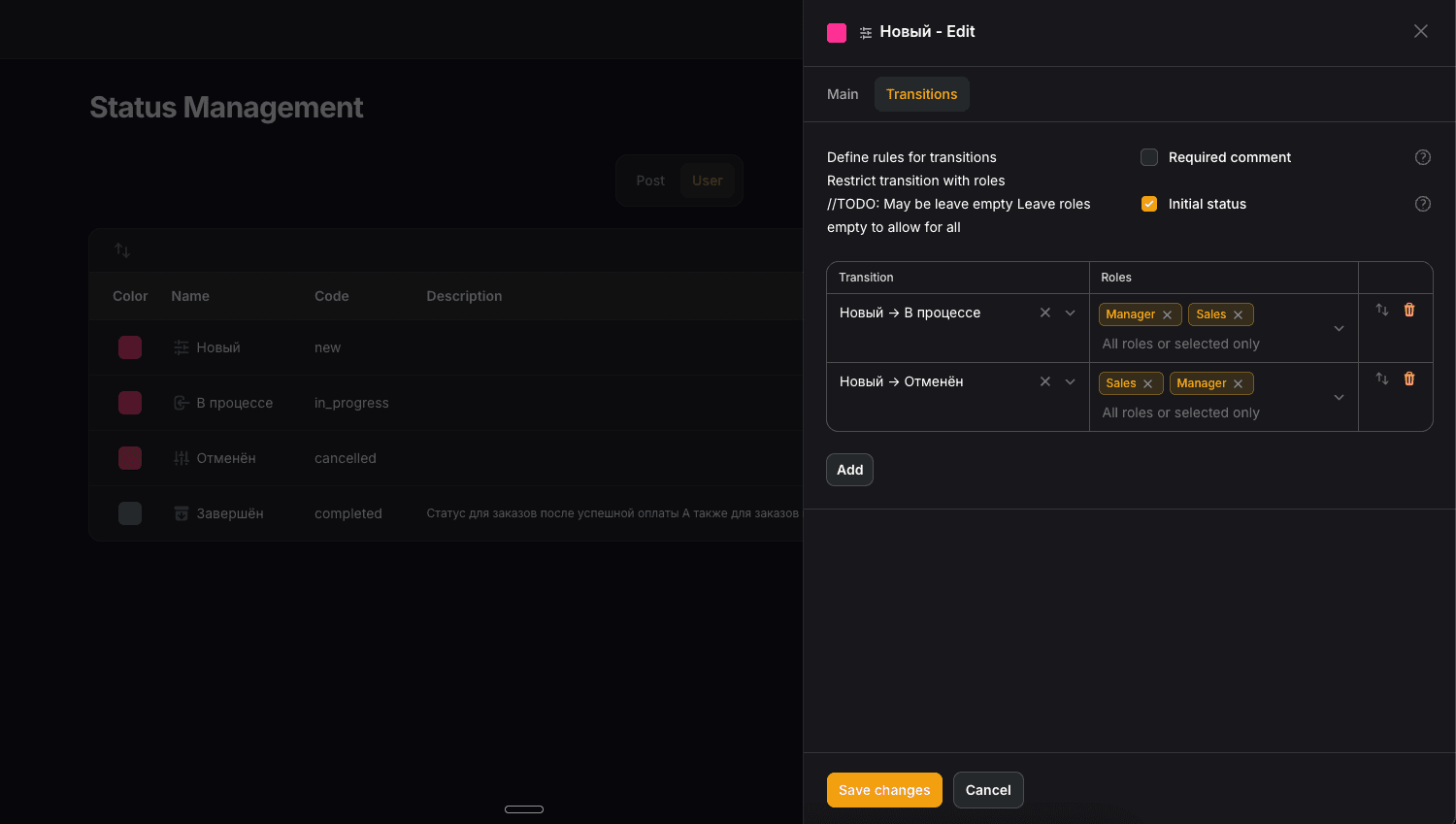
With transitions, you control the exact flow — for example,
an order can go from pending → processing, but not jump directly to completed.
Initial
The Initial checkbox marks a status as available for records that have no status yet — typically on record creation.
When a record is created without a status, only statuses marked as Initial will be available to set. Once a status is assigned, normal transition rules take over.
diUse this to prevent records from being created in an invalid state — for example, a new order should only start as pending, never as completed or cancelled.
Comment
The Comment checkbox makes a comment required when transitioning to this status. If enabled, the user must fill in a comment before the status change is saved.
This is useful for statuses that need a reason — for example, when rejecting or cancelling a record, you may want to know why.
From Table
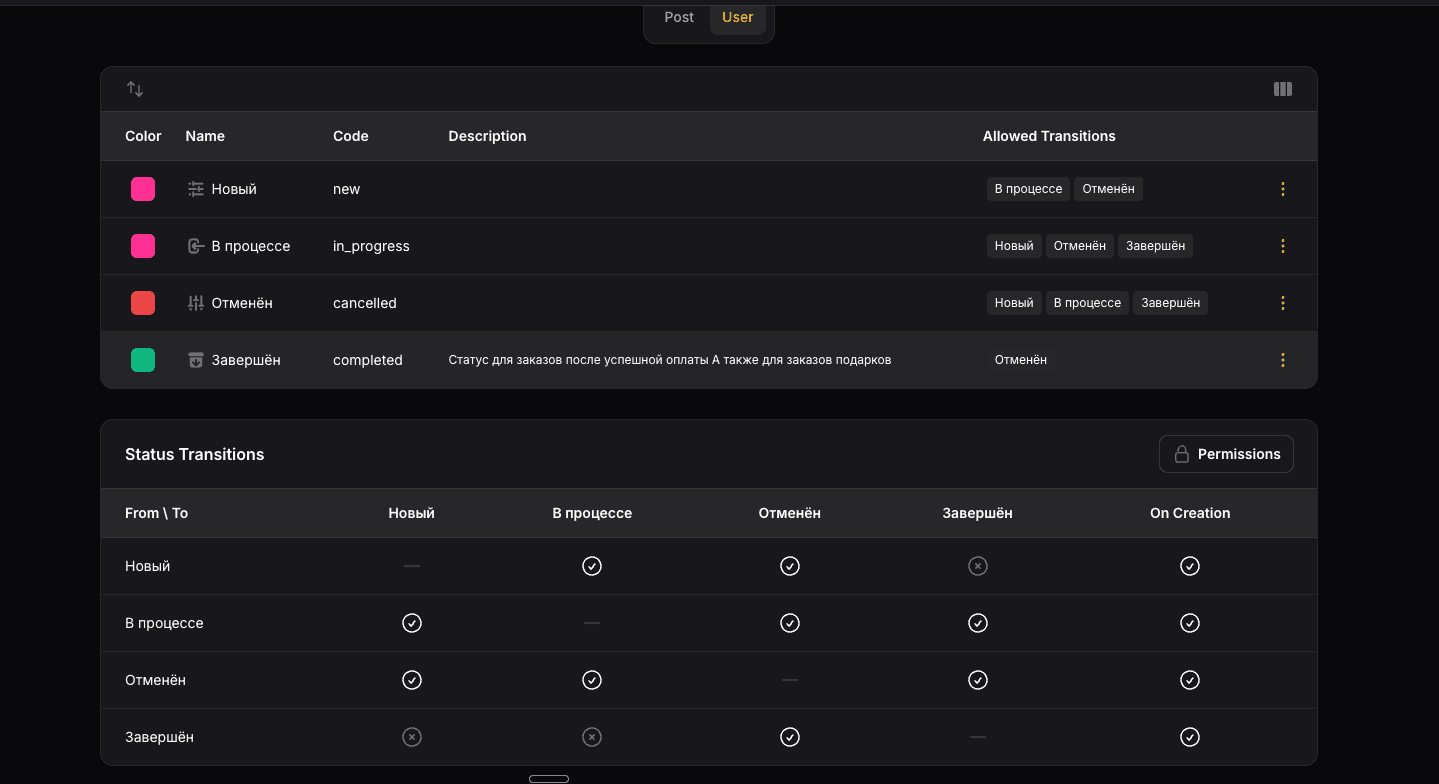
For simple bulk change of transitions use Transitions table.
By default this table is hidden, you can enable it by press Transitions Table button
Use in your code
Use TransitionManager to transition a record to a new status.
Transition Manger will automatically validate transition, permissions,
custom business rules and save changes in log.
use Beboost\StatusManagement\Services\TransitionManager;
use Beboost\StatusManagement\Models\Status;

$status = Status::code('PENDING')->get();
$transitionManager = app(TransitionManager::class);

$transitionManager->transit(
	record: $order,
	toStatusId: $status->id,
	comment: 'my comment'
);Use canTransitTo to check whether a transition is valid before attempting it:
use Beboost\StatusManagement\Services\TransitionManager;
use Beboost\StatusManagement\Models\Status;

$status = Status::code('PENDING')->get();
$transitionManager = app(TransitionManager::class);

$result = $transitionManager->canTransitTo(
		record: $order,
		toStatusId: $status->id
);Result is a TransitionResult object.
TransitionResult
| Method | Returns | Description |
|---|---|---|
isSuccess() | bool | Whether the transition is allowed |
getFailedRule() | TransitionRule|null | Returns the failed rule or null |
TransitionRule is an enum that identifies which check failed:
| Case | Value | Description |
|---|---|---|
TransitionRule::Permission | permission | User does not have the required role |
TransitionRule::Initial | initial | Status is not marked as initial for a new record |
TransitionRule::Matrix | transition | Transition is not defined in the transition matrix |
TransitionRule::Custom | custom | A custom business rule rejected the transition |
Manage Permissions
Permissions let you restrict status changes to specific roles.
On transitions tab you can see Roles column. If you want to restrict access
for specific roles,
select roles from the dropdown.
If you don't need transition restrictions, click Disable Transitions — any status will be allowed at any time.
Default behavior
If no roles are assigned to a transition, all users can perform it regardless of their role. Permissions only restrict access when at least one role is explicitly assigned to a transition. Admin Roles have access to all transitions no matter what permission restrictions are set.
Use in your code
Each transition has a Spatie permission attached to it. You can get the permission name from a status to check it manually or use it in your own logic.
Get permission from a status
use Beboost\StatusManagement\Models\Status;

$status = Status::code('PUBLISHED')->first();

// Returns the Spatie permission name for this status
$permission = $status->permission;
Check if the current user can transition to a status
$status = Status::code('PUBLISHED')->first();

if (auth()->user()->can($status->permission)) {
    // user is allowed to transition to this status
}
Get all roles that have access to a status
$status = Status::code('PUBLISHED')->first();

$roles = $status->permission()->roles;
Automatic permission check
TransitionManager checks permissions automatically on every transit() call. If the current user does not have the required role, an exception is thrown and the status is not changed:
// Throws an exception if the user lacks permission
app(TransitionManager::class)->transit($order, $status->id);canTransitTo also takes permissions into account — it returns false if the transition is not allowed or if the user does not have the required role:
$status = Status::code('PUBLISHED')->first();

// Returns false if transition is not allowed OR user has no permission
if (app(TransitionManager::class)->canTransitTo($order, $status->id)) {
    app(TransitionManager::class)->transit($order, $status->id);
}
How is this guide?